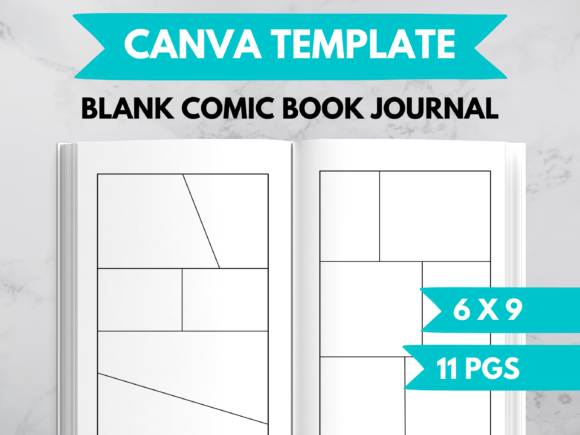
Your Complete Comic Book Journal Template for Canva
Have you ever wanted to create your own comic journal or sketchbook but felt overwhelmed by the technical details of layout and formatting? There's a gap between the initial spark of a creative idea and the finished, printable product. This is where the Comic Book Journal Template for Canva comes in. It is a pre-designed, fully editable file that provides the structural foundation for a 6x9 inch comic journal, ready for you to customize and publish.
Essentially, it's a shortcut. Instead of manually drawing page borders, planning panel layouts, and ensuring consistency across dozens of pages, this template gives you a professional starting point. You bring the content—the story, the sketches, the dialogue—and the template provides the stage. It's designed specifically for Canva, a user-friendly graphic design platform, making it accessible even if you're not a professional graphic designer.
What Makes This Template a Practical Tool
The core value of this Comic Book Journal Template lies in its tested simplicity and flexibility. It isn't a finished book; it's a toolkit. The key characteristics are deliberately straightforward to empower your creativity rather than constrain it.
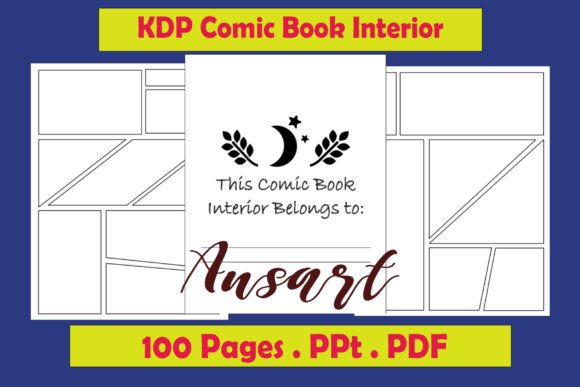
The template is built for the standard 6x9 inch book format, a popular and readable size for journals and comics. It begins with a clean title page, establishing a professional front matter for your project. Inside, you'll find ten distinct comic page layouts. These are your building blocks—layouts with different panel arrangements, from single, full-page frames to pages with multiple grids. You aren't limited to just ten pages, however. In Canva, you can duplicate any of these layout pages as many times as you need, creating a journal of any length.
A critical, often overlooked strength is that this is a tested interior file. The provider has already exported it from Canva as a PDF and successfully uploaded it to Amazon's Kindle Direct Publishing (KDP) platform without errors. This removes a significant technical hurdle. Knowing the file meets KDP's specifications for a 6x9 inch book with "No Bleed" saves you time and prevents frustrating rejection notices during upload.
From Personal Sketchbook to Professional Product
The applications for this template stretch far beyond a single use case. For hobbyists and aspiring comic artists, it's a perfect private sketchbook or journaling space. You can use it to practice sequential art, plot out storylines, or combine drawings with written reflections. The structured panels can help train your eye for composition even in personal work.
Educators and trainers might adapt it for unique classroom projects. Students could use it to create visual summaries of historical events, scientific processes, or literary narratives. The mix of images and text in a comic format can enhance engagement and understanding. Similarly, bloggers or content creators could use the template to produce short, visual anecdotes or promotional comics for their websites or social media channels, exporting individual pages as images.
For entrepreneurs and small business owners, the commercial potential is clear. Using the Comic Book Journal Template for Canva, you can quickly produce a unique physical product to sell. Whether it's a themed creative journal for a niche audience, a custom comic for local marketing, or a blank journal for other artists, the path to publication is streamlined. You customize the interior—perhaps changing the title page words, adding a background image to some pages, or altering a panel layout—then export the entire file as a print-ready PDF. KDP then handles printing, distribution, and sales.
Key Benefits and Real-World Considerations
The primary benefit is efficiency. This template condenses hours of technical setup into a process that focuses purely on content creation and light customization. It also provides professional appearance by default. The layouts are clean and balanced, ensuring your final PDF looks like a real book interior, not a haphazard collection of pages.
From a usability perspective, its integration with Canva is a major advantage. Canva’s intuitive drag-and-drop interface lets you change words, fonts, colors, and images effortlessly. You can even place your own drawings or photos directly into the template panels. Remember, however, that this listing is for the interior template only; a book cover is not included. You will need to design or source a cover separately for a complete KDP paperback.
When implementing it, follow the provided guidance. After editing in Canva, export as a high-quality PDF. When uploading that PDF to KDP, select the matching settings: 6 x 9 inch size, "No Bleed," and your preferred paper and cover finishes. This alignment guarantees the file works without errors.
A Template Designed for Your Needs
Ultimately, the Comic Book Journal Template for Canva is more than just a digital file. It's a bridge between your idea and the tangible reality of a published book or journal. It empowers individuals across a spectrum—from creative professionals to side-hustle entrepreneurs—to produce a formatted comic-style book without deep technical knowledge.
Its notable quality is its balance of structure and freedom. The ten core layouts offer guidance, but you are encouraged to change up the words, the images, or the entire design to suit your needs. This adaptability means your final product is uniquely yours, built on a reliable and tested foundation. All you need is that free Canva account to start turning your creative vision into pages ready for the world.